



Apple HomeView offers a polished smart display experience, but its compact screen and Apple-centered app ecosystem may not meet every household's needs. For families looking for a larger shared display, broader app access, and more flexible smart home functionality, the Apolosign Digital Calendar offers a different approach.
In a recent review titled Apple HomeView Review: Lovely Display, Won't Fix Your Jumbled Smart Home, CNET Smart Home & Robotics Editor Ajay Kumar explored Apple's first smart display, testing its calendar features, smart home integration, personalized profiles, and everyday usability over two weeks.

His review highlights an important consideration when choosing a smart display: a polished interface is only part of the experience. Screen size, app compatibility, and how easily a device fits into an existing smart home setup matter just as much.
For households looking for more than a compact information display, the Apolosign Digital Calendar offers a more flexible Android HomeView experience, combining a larger screen, the openness of Android, third-party app support, and built-in family organization tools in one customizable smart display.

1. Bigger Screens for Shared Family Organization
One limitation highlighted in CNET's Apple HomeView review is its 7-inch display. While its compact design works well on a desk or bedside table, viewing detailed schedules and information from across a room can be challenging.
This becomes particularly relevant when multiple family members need to check appointments, school schedules, household tasks, and daily plans throughout the day.
Apolosign takes a different approach, offering four display configurations:
- 15.6-inch Digital Calendar: A compact option for desks, countertops, and smaller spaces.
- 21.5-inch Digital Calendar: A larger shared display for kitchens and common areas.
- 27-inch FHD Digital Calendar: More screen space for families who want an easy-to-view household calendar.
- 27-inch 4K Digital Calendar: A higher-resolution option for users who prefer sharper visuals and additional screen detail.

Unlike a small personal display, these larger screens make household information easier to view and share. Family members can check schedules, upcoming activities, and daily tasks without having to stand directly in front of the device.
For busy households, a larger display can make a practical difference when the calendar becomes part of the family's everyday routine.
2. Android Flexibility and More App Choices
CNET's review also points out that Apple HomeView does not offer a conventional App Store experience. Its available applications are curated around Apple's ecosystem, and users cannot download apps as freely as they can on an iPad or Android device.
For households that primarily use Apple services, this approach may be convenient. However, users who rely on a wider range of third-party applications may want more flexibility.
The Apolosign Digital Calendar offers two operating modes, giving users different ways to interact with the same device.
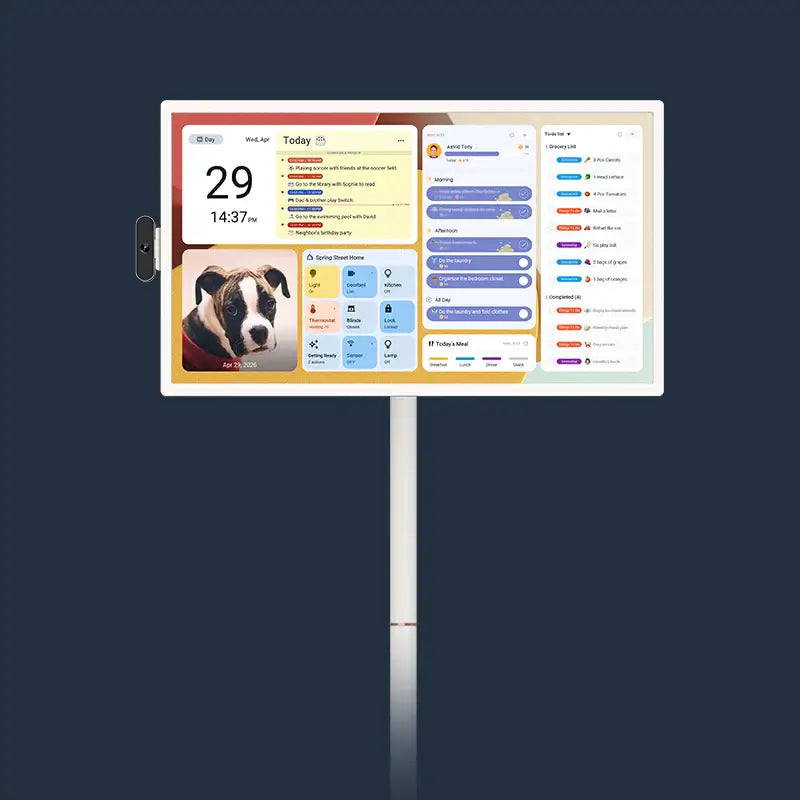
Calendar Mode: Focused Family Organization
Calendar Mode provides a dedicated environment for household planning, including:
- Google Calendar and iCloud two-way synchronization
- Outlook, Cozi, and Yahoo calendar support
- Shared family schedules with color-coded member profiles
- To-do lists and household chores
- Points and rewards management
- Meal planning and recipe organization
- Stickies and family reminders
These tools bring everyday household planning together in one interface, without requiring a separate monthly or annual subscription for core built-in family features.

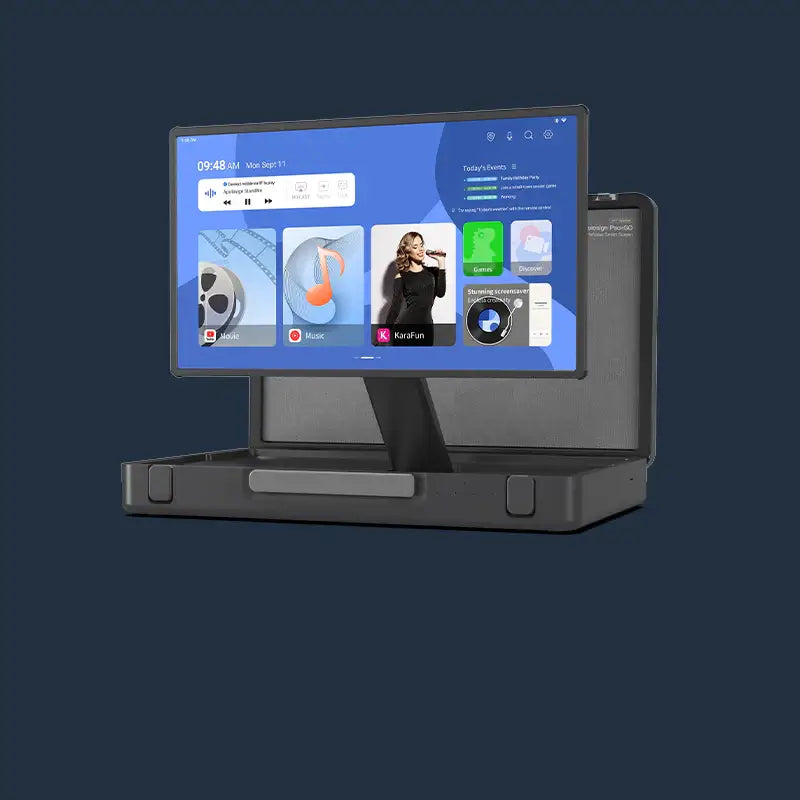
Android Mode: More Ways to Use Your Screen
When users want to go beyond calendar management, they can switch to Android Mode.
With Google EDLA certification and access to the Google Play Store, the device supports downloading compatible third-party Android applications. Users can customize their experience with supported apps and widgets rather than being limited to a fixed set of built-in functions.
This makes the Apolosign Digital Calendar more than a dedicated calendar display. It can also serve as a customizable smart screen for entertainment, information, and everyday household activities.
3. Turn Your Digital Calendar into a Smart Home Control Center
A smart display becomes more useful when it connects different parts of the home.
Apple HomeView is designed to work closely with Apple's HomeKit ecosystem and compatible Matter devices. For households already invested in Apple's smart home platform, this integration can be convenient.
Apolosign offers another approach through Android app compatibility, Google Assistant, and customizable DIY Dashboard capabilities.
With compatible smart home applications and widgets, users can build a personalized dashboard that brings frequently used information and controls together on one screen.
Depending on the apps and devices being used, a DIY Dashboard can include:
- Smart home controls: Access compatible connected devices through supported applications.
- Weather and daily updates: View weather information and other everyday updates.
- Calendar schedules: Display family appointments and household reminders.
- Android app widgets: Add frequently used applications and their supported widgets.
- Personalized shortcuts: Arrange other supported information and shortcuts around household needs.
Rather than relying on one predefined interface, users can arrange their dashboard around their household's preferences.
Google Assistant also provides voice interaction for supported tasks, adding another way to access information and manage compatible smart home experiences.
The result is a more flexible shared screen that can serve as both a household information hub and a smart home interface.

4. Flexible Mounting Options for Different Spaces
Another consideration when choosing a smart display is where and how it will be installed.
Apple HomeView offers desktop and wall-mounted configurations, but the mounting choice can affect the speaker experience.
Apolosign provides different mounting accessories depending on the display size.
| Digital Calendar Model | Included Mounting Accessories |
|---|---|
| 15.6-inch | Desktop stand and wall-mount bracket |
| 21.5-inch | Wall-mount bracket |
| 27-inch FHD | Wall-mount bracket |
| 27-inch 4K | Wall-mount bracket |
For the 15.6-inch and 21.5-inch models, an additional magnetic refrigerator mounting accessory is available. This allows users to place the calendar on a refrigerator door, making it convenient to check schedules and household reminders while preparing meals or moving around the kitchen.
These options make it easier to integrate the calendar into different household layouts, whether it is used on a desk, mounted on a kitchen wall, or positioned on a refrigerator.
5. A Family Calendar Without Monthly Subscription Fees
Beyond hardware and software flexibility, ongoing costs are another factor worth considering.
Apolosign Digital Calendar includes its core family organization features without recurring monthly or annual subscription fees.
Calendar synchronization, household tasks, rewards, meal planning, to-do lists, and other built-in family management tools are available without a separate subscription. Software updates, including seasonal theme updates, are also provided free of charge.
For families who want a shared digital calendar without adding another recurring household expense, this is an important distinction.

Apple HomeView vs. Apolosign Digital Calendar: Which Fits Your Household?
Both devices bring digital information and smart home functionality into the home, but they are designed around different priorities.
| Feature | Apple HomeView | Apolosign Digital Calendar |
|---|---|---|
| Display size | 7 inches | 15.6, 21.5, 27-inch FHD, and 27-inch 4K |
| Operating environment | Apple-centered experience | Android with Google EDLA certification |
| Third-party apps | Curated app selection | Google Play Store with compatible Android apps |
| Family calendar | Apple Calendar integration | Google, iCloud, Outlook, Cozi, Yahoo |
| Family organization | Calendar and reminders | Calendar, chores, rewards, meal planning, to-dos, and stickies |
| Smart home | HomeKit and compatible Matter devices | Google Assistant and compatible Android smart home apps |
| Customization | Personalized faces and widgets | Six everyday themes, seasonal themes, and DIY Dashboard |
| Mounting options | Desktop and wall mounting | Desktop, wall mounting, and optional magnetic refrigerator mounting on selected models |
| Subscription | Apple service and app requirements vary | No subscription fee for core built-in family features |
Apple HomeView May Be a Good Fit For:
- Households already deeply integrated into Apple's ecosystem.
- Users who prefer a compact display for a desk or bedside table.
- People who prioritize Apple's personalized interface and HomeKit integration.
Apolosign Digital Calendar May Be a Better Fit For:
- Families who want a larger shared screen for household schedules.
- Users who prefer Android app access and more customization options.
- Households looking to combine calendar management with smart home controls.
- Families who want flexible desktop, wall, or refrigerator placement.
- Buyers who prefer built-in family organization features without recurring subscription fees.
The Bottom Line
Apple HomeView demonstrates how a compact smart display can bring calendars, personalized information, and smart home controls into everyday spaces. However, as CNET's Ajay Kumar highlights in his review, a smaller screen and a curated app ecosystem may not suit every household.
For families who want more room to view shared schedules, greater flexibility in choosing applications, and more ways to organize their smart home experience, the Apolosign Digital Calendar offers a compelling alternative.
With multiple screen sizes, Android Mode, Google Play Store access, DIY Dashboard customization, built-in family organization tools, and flexible mounting options, it is designed to do more than display the date.
It gives the whole family a shared screen for planning, organizing, and staying connected.
Explore the Apolosign Digital Calendar lineup to find the screen size and setup that fit your home.