


A mobile TV does more than add a second screen to your home. It changes which rooms count as entertainment spaces. Streaming services gave you the freedom to watch anything, but a fixed TV on a wall still decides where you watch it. A movable TV removes that last constraint.
What Is a Mobile TV and How Is It Different from a Traditional TV?
Most people assume "mobile TV" means a small screen for road trips.
What Is a Mobile TV
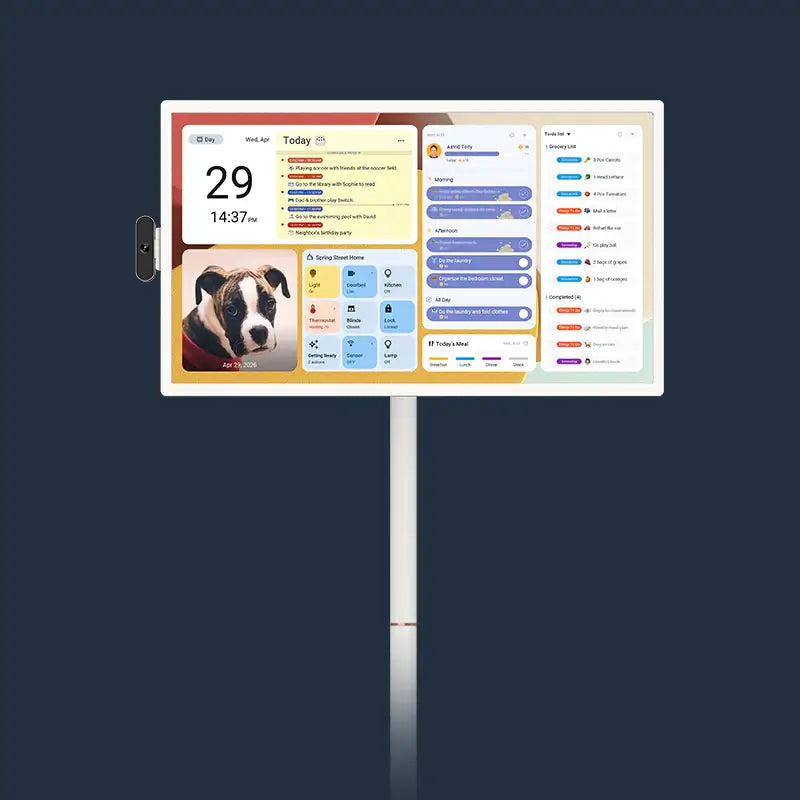
A mobile TV is built to relocate on demand. It runs a complete operating system, connects to Wi-Fi, and supports the same streaming apps you already use. A movable TV holds its own battery and sits on a wheeled stand or portable base, so it follows you to the kitchen, the backyard, or the bedroom without a cord or a mounting bracket.
What Makes a TV Truly Movable
Not every small TV qualifies as a movable TV. Three features separate the category from a basic second-room screen:
- Built-in rechargeable battery: This is what makes the "move anywhere" claim actually work. Without it, you are still hunting for the nearest outlet every time you change rooms.
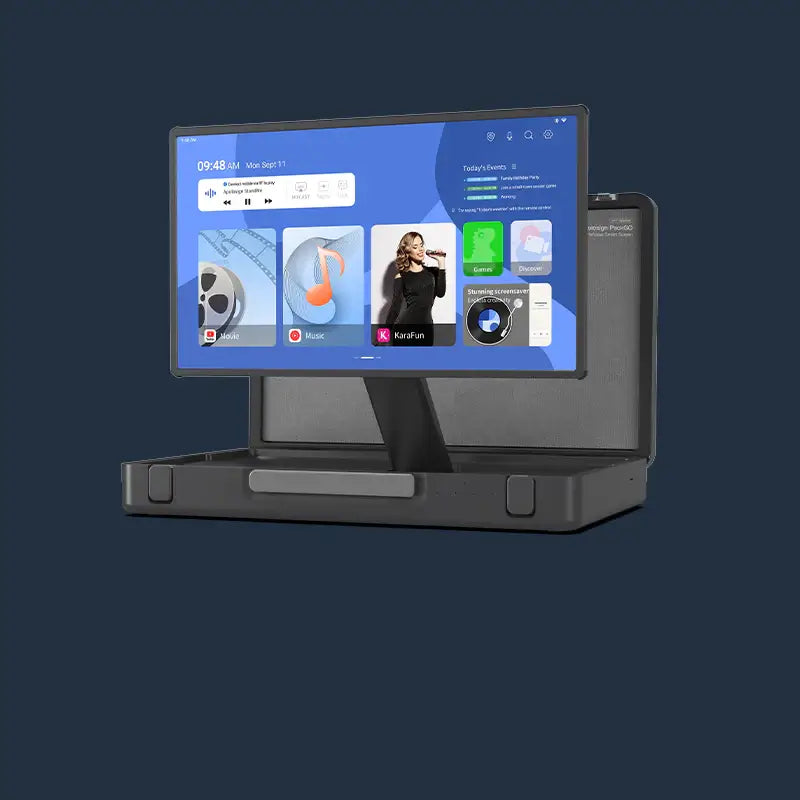
- A base or stand designed for relocation: A TV you have to carry each time is impractical for daily use. Wheeled bases handle room-to-room moves without lifting. Compact carry-style designs suit travel and outdoor use.
- A full smart OS with app access: A movable screen without streaming app support is just a monitor. Android OS with Google Play access is the current standard for practical home use.
How a Mobile TV Compares to a Fixed TV
|
Feature |
Traditional Fixed TV |
Mobile TV |
|
Location |
One room, permanent |
Any room, on demand |
|
Power source |
Wall outlet required |
Built-in battery |
|
Installation |
Wall mount or furniture stand |
No installation needed |
|
Portability |
Not designed to move |
Built for daily relocation |
|
Smart OS and apps |
Varies by model |
Standard on current models |
A traditional TV does one thing well: it delivers a large, high-quality picture in one fixed spot. A mobile TV trades some of that permanence for the ability to be wherever you need it. For households with more rooms than screens, that trade is worth making.

Why Your Current Streaming Setup Is Not as Free as You Think
Streaming removed content restrictions. It did not remove location restrictions. Here is where the gap actually shows up in daily home life.
Content Freedom vs. Space Freedom
You can watch anything, anytime. But you can only watch it in the room with the TV. That is a different kind of limitation, and most households run into it regularly. One person wants the news on, another wants to watch a show, and a third wants to put on something for the kids. A single fixed screen cannot serve all three at once.
The Wall Mount Problem
A wall-mounted TV locks content to one room and one viewing angle. Rearranging furniture means rethinking the entire setup. Adding a TV to a new room means buying another unit, running cables, and often drilling into walls, which is not always practical or permitted.
Renters, Small Spaces, and the No-Drill Dilemma
Renters in particular have limited options. Lease agreements often restrict wall modifications, which rules out traditional mounting entirely. A movable TV solves this without any installation at all, and it moves out when you do.
What Can You Actually Do With a Mobile TV?
A movable TV works differently in each room of the house.
Kitchen, Bedroom, and Home Gym: Room-to-Room Viewing Made Real
In the kitchen, a mobile TV handles recipe videos hands-free. A touchscreen lets you pause mid-cook without looking for a remote or wiping down a phone screen. The built-in speakers carry over ambient kitchen noise better than a tablet does.
In the bedroom, it replaces the need to install a permanent wall unit. Bring it in for the evening, move it out when you want the space back. No mounting hardware, no long-term commitment to a layout.
In a home gym, it holds workout videos at eye level. An adjustable tilt angle means the screen stays readable whether you are standing, on a mat, or using equipment nearby.
How a Mobile TV Enhances Your Work-From-Home Setup
A movable TV doubles as a secondary display during the workday. Position it next to your desk for video calls, reference material, or background audio. At the end of the day, it moves back to the living room. No second monitor to install, no cables to manage across the house.
Outdoor Entertaining, Backyard Movie Nights, and Camping
A battery-powered movable TV removes the extension cord from outdoor setups entirely. Backyard movie nights, patio grilling sessions, and camping trips all work without a power outlet nearby. The built-in battery handles the full session without needing a generator or a long cable run from the house.
Brings People Together Again
A mobile TV makes it easy to gather in any room, not just the living room. Pull it into the kitchen for a family cooking session, the backyard for a weekend barbecue, or a guest room for visitors. A screen in the 24 to 32-inch range holds a group of two or three comfortably without anyone squinting.
Movable TV vs. Tablets: Which Is Better for Viewing?
For solo use at close range, a tablet is fine. For shared viewing, open spaces, or any distance past a few feet, a movable TV is the better screen. Tablets are already in most homes, so the comparison matters before spending money on another device.
Screen Size Comparison
|
Feature |
Tablet (8–13 inches) |
movable TV (24–32 inches) |
|
Solo viewing, close distance |
Comfortable |
More than needed |
|
Two or more viewers |
Cramped |
Comfortable |
|
Viewing from across the room |
Difficult |
Normal use case |
|
Vertical video, portrait content |
Good |
Supported on rotating models |
|
Audio in open spaces |
Often insufficient |
Built-in dual speakers |
A tablet works well for one person watching from arm's length. A movable TV works better for any shared or room-distance viewing.
Shared Viewing vs. Solo Scrolling
Tablets are personal devices, designed around one user at arm's reach. A mobile TV is a room device, designed to anchor a space and serve whoever is in it. These are genuinely different use cases, not competing ones.
Audio Quality and the Full Viewing Experience
Tablet speakers are functional for private use. They fall short in a kitchen or a backyard where ambient noise competes. A mobile TV with built-in dual speakers handles that gap without needing a separate Bluetooth speaker alongside it.
How to Choose the Right Mobile TV for Your Home
The specs that matter most for a movable TV are different from those that matter for a wall-mounted setup. Focus on these four before buying.
Screen Size
|
Screen Size |
Best For |
Typical Users |
|
24 inches |
Kitchen counter, bedroom, single viewer |
One or two people |
|
27 inches |
Flexible home use, travel, mixed indoor and outdoor |
One to three people |
|
32 inches |
Living room, family room, outdoor patio |
Two or more people |
The right size depends on the primary room and how many people typically watch at once. Apolosign's 24-inch smart portable TV, 27-inch briefcase portable TV, and 32-inch smart portable TV are built around exactly this split, with each size optimized for the room type it will most likely live in.

Battery Life
Most household sessions, including cooking, a workout, or a movie, run between one and three hours. A model rated at four hours covers typical daily use with room to spare. If outdoor entertaining or longer continuous use is a regular need, look for models rated higher. Always read battery figures as "up to" numbers, since real-world runtime with active streaming and higher brightness settings will run lower than the rated maximum.
Connectivity and Smart Features Worth Checking
Wi-Fi connectivity and a full app store handle most daily streaming needs without any additional devices. HDMI input adds flexibility if you want to connect a laptop or gaming console. A built-in camera and microphone let you take video calls directly on the screen, which is useful in the kitchen or living room without needing a separate device.
Stand and Mobility Design
Wheeled models are easier to reposition across rooms on a daily basis without picking up the unit. Briefcase-style portable models trade the wheeled convenience for a more compact, carry-friendly form that suits travel or moving between locations outside the home. Adjustable height and tilt angle make a real difference in daily use, because the screen needs to work whether you are seated at a table, standing at a counter, or on a couch.
Is a Mobile TV Worth the Investment?
A movable TV delivers the most value to households that regularly use more than one room for entertainment or have multiple people competing for the same screen.
- Families with competing content needs across different rooms will use a mobile TV daily.
- Renters or anyone who cannot drill walls will find it the only practical large-screen option.
- Home cooks, people with home gyms, and anyone who regularly watches content in more than one room get clear daily value from the mobility.
A movable TV costs more than a basic fixed TV at the same screen size. The higher price covers what makes it mobile: the battery, the stand design, and the smart OS. If those features match how your household actually lives, the cost is justified.
Find a Mobile TV That Fits Your Home
A mobile TV closes the gap between content freedom and space freedom. The fixed wall stays where it is. The screen follows you. From the kitchen counter to the backyard, the use case is simple: the right screen in the right room at the right time. If more than one person in your household competes for the main TV, or if your home has rooms that have never had a screen, a movable TV covers that ground. Apolosign's portable TV range, available in 24-inch, 27-inch, and 32-inch sizes with built-in batteries, Android OS, touchscreens, and zero subscription fees, is a practical starting point for families looking to add that flexibility without a permanent installation.

Apolosign PackGo 27" Briefcase Portable TV
FAQs About Mobile TV
Q1. How Is a Movable TV Different From a Smart TV on a Furniture Stand?
A movable TV includes a built-in battery specifically designed to untether it from wall outlets. A smart TV on a furniture stand requires a power cord to operate. The battery is the defining practical difference, not the stand style.
Q2. Does a Mobile TV Work if My Wi-Fi Signal Is Weak in Certain Rooms?
Streaming quality will drop in weak signal areas, the same as any Wi-Fi device. Models with HDMI or USB inputs let you play local content from a connected device as a fallback. For consistent streaming across rooms, a Wi-Fi extender is a straightforward fix.
Q3. Can Kids Use a movable TV on Their Own?
Yes, with parental controls in place. Android OS supports app restrictions and screen time limits through Google Family Link, a free parental control tool built into Android. The touchscreen interface is straightforward for older children, and the ability to physically move the unit to a supervised space makes screen time easier to manage.
Q4. What Should I Check Before Buying a Mobile TV for Outdoor Use?
Confirm the battery rating and factor in that active streaming at higher brightness uses more power than manufacturer tests typically reflect. Also check whether the screen has a matte or anti-glare finish. Direct sunlight makes glossy screens very hard to see, and most portable TVs use standard LCD displays that are not rated for bright outdoor conditions.