


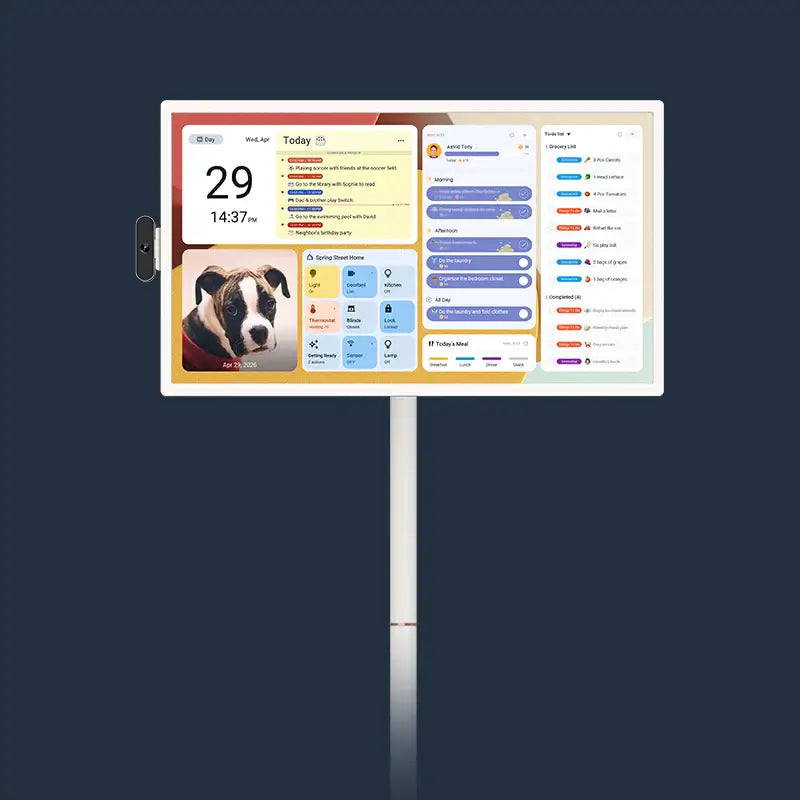
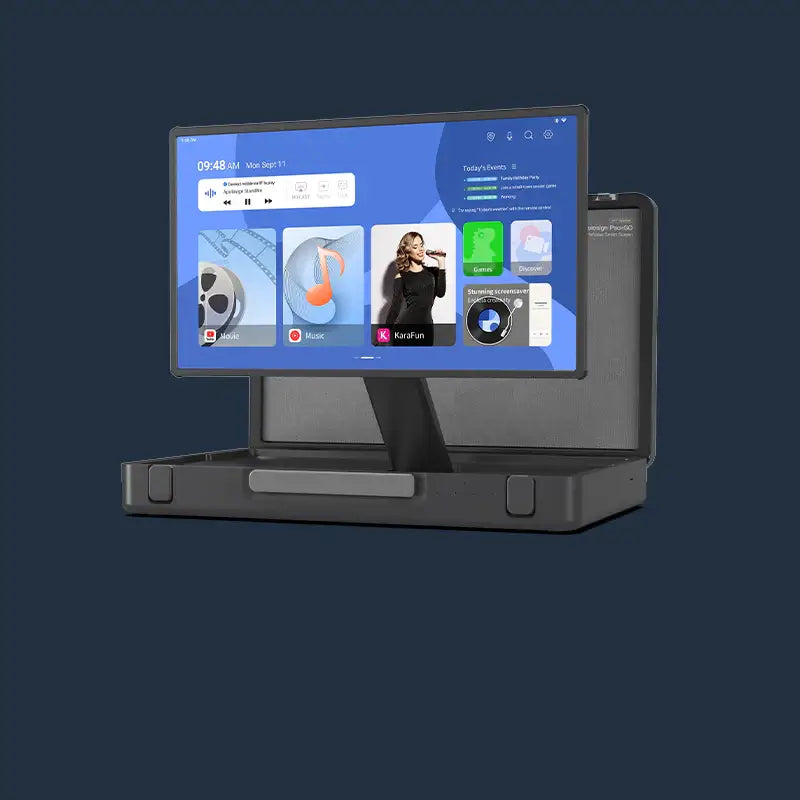


For an LG StanbyME 2 vs Apolosign 32-inch portable TV decision, the Apolosign 32-inch Portable TV is the stronger fit when one screen needs to serve family viewing and everyday household planning. It gives the room more viewing space, Android apps with Google Play Store access, HDMI, and the Apolosign Calendar system. LG StanbyME 2 makes more sense when a detachable 27-inch screen and LG’s webOS experience are the main priorities.
Quick Answer for a Shared Family Screen
Choose the Apolosign 32-inch Portable TV if the screen will often sit across a room, move between family spaces, or double as a shared schedule display. Its larger panel and built-in calendar tools give one screen two jobs: entertainment and family organization.
Here is the practical difference at a glance. Prices and listed features below were checked on the U.S. product pages on November 11, 2026. Promotions, stock, and model options can change, so check the linked pages before ordering.
| Feature | LG StanbyME 2 | Apolosign 32-inch Portable TV |
|---|---|---|
| Listed U.S. price | $899.99 for the 27-inch screen without accessories | From $719 on the store home page. The 32-inch 4K option was listed at $819 on its product page. |
| Screen size and picture | 27-inch QHD touchscreen | 32-inch touchscreen in 1080p or 4K |
| Main mobility difference | Rolls on its stand and the screen detaches | Rolls on a five-wheel stand; the screen is not presented as detachable |
| Battery claim | Up to 4 hours | Up to 6 hours at 50% brightness while streaming by Wi-Fi |
| Smart platform | webOS, LG Channels, touch, voice, and mobile mirroring | Android apps and Google Play Store content, touch, remote, and voice control |
| Wired connection named on the product page | USB-C connection | HDMI, USB-A, and USB-C |
| Family planning tools | LG’s product listing does not describe shared calendar sync, meal planning, or family reward tools | Apolosign Calendar dashboard with shared schedules, routines, meal planning, and points rewards |
The table is not a scorecard. It shows why the better portable TV for family use depends on the task your screen has to handle after the show ends.

Screen Size and Picture Options for Family Viewing
A 32-inch display gives a shared room more breathing room. The extra five inches can make a difference when children are at the table, one parent is cooking, and another person is watching from the sofa. It also gives the family calendar more room when several events or tasks need to stay visible.
The 27-Inch QHD Option
LG lists the StanbyME 2 with a 27-inch QHD display. That size can work well near a chair, bedside, desk, or small activity area where one or two people sit close to the screen. It also suits a household that values a detachable screen.
The 32-Inch 1080p or 4K Option
The Apolosign 32-inch model gives families a larger touch display with a choice of 1080p or 4K resolution. The 1080p option can suit everyday streaming and calendar use. Choose 4K if sharper detail is a priority for close viewing, photos, or video.
Size also helps when the screen changes roles. A child can see the day’s plan from the kitchen table while an adult follows a recipe or show from across the room.

Movement and Screen Position Around the Home
The key choice is detachable carry versus a larger rolling screen. Both products move, but they solve that movement in different ways.
The Detachable LG Screen
LG says the StanbyME 2 can roll on its stand, detach from that stand, and connect through USB-C. This is a clear advantage for a household that wants to take the 27-inch display off the floor stand for a short session in another spot.
The Adjustable Apolosign Stand
The Apolosign 32-inch Portable TV is built to roll from room to room on its stand. The product page lists five wheels, height adjustment, tilt, swivel, and portrait rotation. Those adjustments help a family set the screen for a movie on the sofa, a standing recipe session, or a tall calendar view.
Set the screen low for seated viewers, raise it for a standing task, or turn it to portrait for a family schedule. The wheels are not described as locking because that is not a listed product feature.
Apps, Casting, and Connected Devices for Your Content
Check your must-have app and connection before you compare picture quality. A screen is only useful if it can show the content your household actually uses.
LG runs webOS, with access to apps, LG Channels, mobile-device mirroring, touch control, and voice recognition according to LG’s U.S. listing. It also names a USB-C connection. Families who already prefer the webOS app experience may find that familiar.
Apolosign Portable TVs give families access to Android apps and Google Play Store content. The 32-inch model also lists Wi-Fi streaming, Bluetooth, HDMI, USB-A, and USB-C. HDMI gives a laptop or game console a direct wired connection.
Make a short check before you buy:
- Search for the streaming or learning app your family uses most on the platform you plan to use.
- Confirm which connection a phone, laptop, or game console needs.
- Test Wi-Fi where the screen will spend the most time.
This check prevents a feature list from becoming a surprise after delivery.
Battery Time and Charging for a Real Viewing Session
Brightness, volume, app activity, and network use can change battery time.
LG lists up to four hours for the StanbyME 2. That can cover a movie, a short class, or a few hours in a room without a nearby outlet. LG also notes that actual battery use varies with network connectivity and app use.
The Apolosign 32-inch Portable TV lists up to six hours, tested at 50% brightness during Wi-Fi video streaming. It is a comparison point for a family planning a movie afternoon, routine checks, and light evening viewing before charging.
For either model, charge before a planned event, especially before moving it away from an outlet.
The Calendar Difference in a Shared Family Routine
Apolosign gives a shared family screen a job that LG’s StanbyME 2 product listing does not present: keeping household plans visible and usable. The 32-inch Portable TV includes the Apolosign Calendar system, so it can show the shared schedule, routines, meal planning, task lists, and points rewards that families use on an Apolosign Digital Calendar. That is the same Apolosign Calendar used on our 15.6-inch Digital Calendar, 21.5-inch Digital Calendar, and 27-inch 4K Digital Calendar.
In the morning, it can show who needs to leave and what is for dinner. After school, a child can check a routine or points total. At night, it can switch back to a show, a video call, or a connected device.
Under Apolosign’s current pricing, calendar sync, meal planning, points-based chore rewards, photo album uploads, and the customizable dashboard do not require an additional subscription fee. The statement is limited to current pricing and those named features. It is not a promise about future services or pricing.
LG’s page highlights entertainment, touch activities, Mood Maker, webOS apps, mobile-device mirroring, and voice control. Those can be useful features. It does not list the StanbyME 2 as a shared family calendar with schedule sync, meal plans, or a household points system. For a family that wants one portable screen to help coordinate the day, that is a meaningful functional difference.
Why Pick Apolosign for a Shared Family Screen
Pick the Apolosign 32-inch Portable TV when the screen needs to do more for the whole household. Its advantages are clear:
- A larger shared screen: 32-inch touchscreen, with 1080p or 4K options.
- More ways to watch, work, and play: Android apps, Google Play Store content, Wi-Fi, Bluetooth, HDMI, USB-A, and USB-C.
- More use between charges: up to six hours under the stated Wi-Fi streaming test condition, compared with LG’s listed up-to-four-hour claim.
- A built-in family command center: The Apolosign Calendar system keeps shared schedules, routines, meal plans, task lists, and points rewards on the same screen the family already uses.
- A stand that adapts to the room: five wheels, height adjustment, tilt, swivel, and portrait rotation.
Match the Screen to Your Family’s Next Task
Choose LG StanbyME 2 when a detachable 27-inch screen and webOS are the reason you are shopping. Choose the Apolosign 32-inch Portable TV when the household needs a larger rolling display for shared viewing, Android apps, HDMI devices, and a family calendar that stays useful between shows. Check the current configuration, price, and accessories, then choose the screen that will earn its space every day.
LG StanbyME 2 vs. Apolosign 32-Inch Portable TV FAQs
Q1: Is a 32-inch portable TV too large for a family room?
No. A 32-inch screen can be practical when several people look at it at once. Measure the route between rooms and the spot where the stand will rest. It should be easy to use in its regular place, not only easy to move on the first day.
Q2: Can the LG StanbyME 2 screen be used without its stand?
Yes. LG describes the StanbyME 2 as detachable from its stand. Check LG’s current instructions and included accessories before planning a wall, table, or carry setup. The screen needs a secure place after removal.
Q3: Does the Apolosign 32-inch Portable TV work with a laptop or game console?
Yes. The 32-inch model lists HDMI, USB-A, USB-C, Wi-Fi streaming, and Bluetooth. HDMI is the clearest listed option for a wired laptop or console. Confirm the cable type and source output before setup.
Q4: What affects portable TV battery life?
Brightness, volume, the app in use, and network activity can affect battery time. Treat an “up to” claim as a test condition, then charge ahead of a longer session.
Q5: Can a portable TV replace a separate family calendar?
It can when the model includes the calendar tools your household needs. The Apolosign 32-inch Portable TV includes the Apolosign Calendar system for shared schedules, routines, meal planning, and points rewards. A screen without those tools can still show entertainment and apps, but it will not provide the same shared planning setup.