


The chaos of modern family life isn't just a feeling; it's a logistics problem. It’s the stack of permission slips, the text message about soccer practice pickup, and the sinking feeling that you and your partner just double-booked a Saturday afternoon.
Why Phone Calendar Apps Worked Until They Didn’t
For a long time, the shared calendar app on your phone was a quiet miracle. It was the simple, effective way you and your partner stopped scheduling conflicts for dinner dates or dentist appointments. It was clean, portable, and synced (mostly).
Then, life got more complicated.
You added a second child, whose social life is now busier than yours. You added a third-party app for school assignments. You added another app for the kids’ chore charts. You added your work calendar, your personal calendar, and the "Family" calendar everyone is supposed to be checking.
Suddenly, the simple tool is the source of the chaos. The phone that was supposed to organize everything has become a digital "junk drawer" of competing "information silos". The real schedule, the one source of truth, is now fragmented across five different apps, and you are the only person who knows how to read all of them. The phone app system worked when life was simple, but it breaks down under the weight of a truly busy, multi-person household.
What Exactly Is a Digital Family Wall Calendar?
A digital family wall calendar is the solution to that fragmentation. It is a dedicated screen, usually placed in a high-traffic area like a kitchen, that acts as your family's central command center.
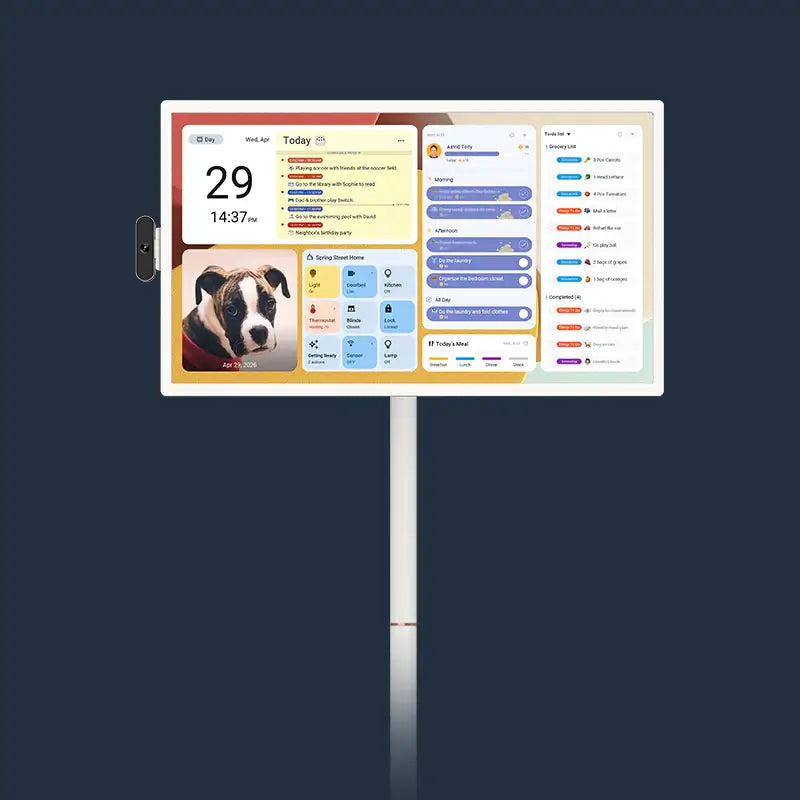
Think of it less as a "gadget" and more as the 21st-century evolution of the giant paper calendar that used to hang on the kitchen wall. It takes all those scattered digital pieces: soccer practice from Google Calendar, dad's work trip from Outlook, the kids' chores, the grocery list, and pulls them all into one, single, always-visible display for the entire family to see.
It is not just a tablet mounted to the wall. High-end digital calendar displays are purpose-built for this job. For example, the Apolosign 27" 4K features a stunning 27-inch 4K ultra-clear display, which is large enough for a whole family to see the month at a glance. More importantly, it has a professional-grade anti-glare matte finish. That specific detail means you can actually read it in a bright kitchen, where a glossy tablet or TV screen would just reflect the window and become unreadable.

7 Signs Your Family Has Outgrown Phone-Only Planning
How do you know when the "Coordination Gap" at home has become critical? You are likely already there if you recognize any of these common symptoms.
1. You Suffer from Frequent "Double-Bookings" or Missed Events.
This is the classic sign. One partner thought the other was handling school pick-up. A birthday party RSVP was missed. You scheduled a repairman during a "virtual" meeting that was actually an "in-office" day. These small collisions are the result of schedules not being properly shared or, more likely, not being visible.
2. You Experience "Sync Weirdness."
You hear phrases like, "I added it, why can't you see it?" or "I'm getting duplicates of all your events". These technical glitches are notoriously common when mixing calendar ecosystems, like sharing an Apple calendar with a Google or Outlook user. When the system's reliability is questionable, people stop trusting it. Appointments get missed not because someone forgot, but because the technology failed.
3. You Are the "Family Program Manager."
One person in the household (let's be honest, it's probably you) carries the entire "mental load" of family organization. You are the one who fields the constant questions: "What's for dinner?" "Do I have practice today?" "When is grandma coming?" You have become the human "program manager" for your family, and your brain is the only hard drive.
4. Your Chore System Is Chaos.
You have tried apps, paper charts, and "gentle reminders" that have turned into nagging. The "gamified" chore apps on your kids' phones are just another notification for them to ignore. There is no central, visible record of who did what, when it was last done, or what the reward is. The result is a mess of frustrated conversations and a feeling that chores are unevenly distributed.
5. Your Fridge Is Covered in Paper.
The refrigerator door or counter is buried under school flyers, sticky notes, team schedules, and take-out menus. This is a desperate, analog attempt to create a "central hub" because your digital tools have failed. It is a physical symptom of digital fragmentation.
6. Your Kids Can't "See" Their Own Time.
Your kids live in the immediate "now." They have no concept of how a busy week feels. They don't understand that a fun Saturday is followed by a Sunday packed with commitments. Phone calendars are terrible at this, often showing only a "dot" on a day. Kids need to visualize their time to learn how to manage it, a skill phone apps simply do not teach.
7. You Have Multiple, Competing "Sources of Truth."
You check your phone's calendar for appointments, a separate app for your grocery list, and a third app for your kids' tasks. There is no single place to get a complete answer. The mental energy you spend just to get a clear picture of your own day is exhausting.

What a Wall Calendar Does That Phone Apps Simply Can’t
A dedicated digital wall calendar is not just a bigger screen; it is a fundamentally different tool. It solves the problems of fragmentation and mental load in ways a personal phone never can.
First, it creates a "single source of truth" that is public, persistent, and passive. Everyone sees the same information, at the same time, without having to do anything. It provides "at-a-glance visibility" that reduces scheduling anxiety. The best part? You do not have to change a thing about your current habits. A premium digital family calendar like the Apolosign 27" 4K features Family Calendar auto-syncs. It works not just with the big three (Google Calendar, Apple Calendar, Outlook) but also with other popular platforms like Yahoo Calendar and even Cozi. All those silos are automatically pulled into one, beautiful, clear view.
Second, it turns chores and routines into visible achievements, not invisible nags. Instead of a hidden app, the chore chart is public. The Apolosign system features a routine task tracker with points. This powerful tool turns chores into rewards and helps kids build good habits. Everyone can see that "Take out trash" is complete, and the child who did it can see their points add up, eliminating the "I forgot" excuse. You also get custom to-do lists, perfect for a shared grocery, shopping, or wish list that anyone can add to.
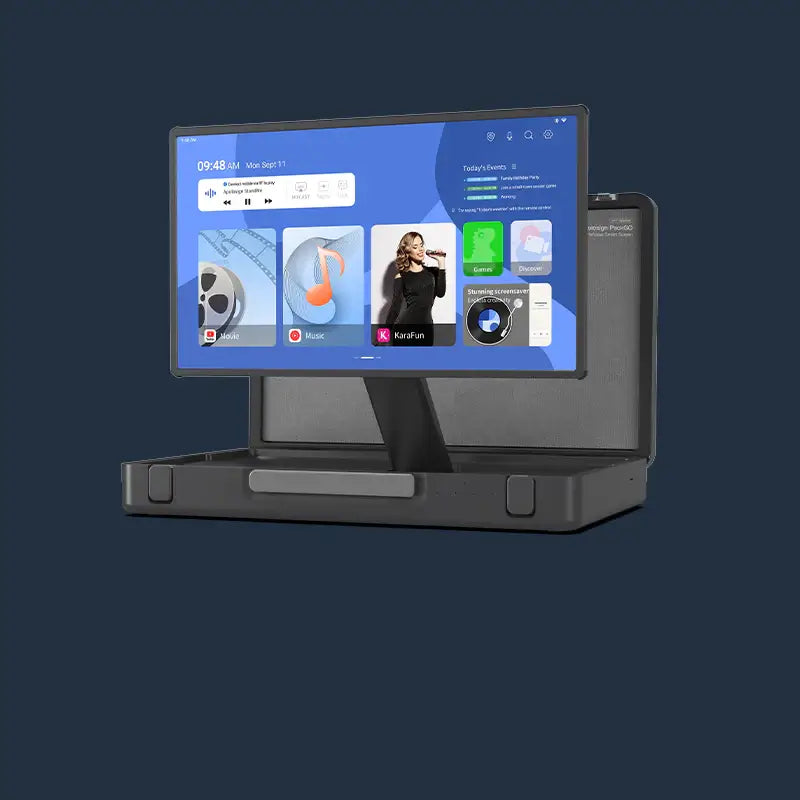
Third, it adapts to your family’s precise needs. Many devices force you into one way of thinking. The Apolosign 27" 4K, for instance, has an innovative Dual-Mode Experience.
- Focus Mode (Calendar Mode): This is your Immersive Calendar View. It is a clean, beautiful, full-screen display of your family's schedule, chores, and lists. It is perfect for a focused morning review of the day ahead.
- Custom Mode (Android Mode): With a swipe, it becomes a customizable Android Dashboard. This allows you to freely download and arrange widgets for calendar, weather, music, stocks, meal plans, and more. You can build the perfect home hub for your specific family, all on one screen.
When Phone Apps Are Still Enough and How to Make Them Work Better
A digital wall calendar is a powerful tool, but not every family needs one. If you are a single person, a couple with a very simple schedule, or have older, self-sufficient teens who are already masters of their own (synced) calendars, phone apps may work perfectly fine.
If you want to stick with a phone-only system, you must be disciplined. Success depends on creating a strict, shared system:
- Choose One "Master" Calendar: Designate one calendar (e.g., the "Google Family" calendar) as the single source of truth. All events that affect the family must go here.
- Use Color-Coding Rigorously: Assign a specific color to each family member. It is the only way to get a quick visual organization of who is doing what.
- Establish Clear Guidelines: Hold a family meeting and agree on the "rules." What gets added? Who adds it? What is the format for event titles?.
- Conduct Regular Check-Ins: Encourage family members to review the calendar regularly. The "Family Program Manager" must still conduct regular audits to see what is missing and update the calendar. The system still relies on one person's diligence.

How to Transition from Phone-Only to a Wall-Based Family System
Moving to a wall-based system is an upgrade for your entire family's workflow. The key is to integrate it into your home's natural rhythm.
First, location is everything. Install your digital calendar in the most high-traffic area of your home, like the kitchen or mudroom. It needs to be at a comfortable viewing height for both adults and kids, where it will be seen dozens of times a day.
Second, create a new family habit: the "Weekly Review". Spend 10 minutes every Sunday evening with the whole family gathered around the display. Look at the week ahead. Identify the busy days, the potential conflicts, and the carpool logistics. This single habit, centered on a public display, teaches kids time management and officially distributes the mental load from one person to the entire "team."
Finally, embrace the device as your home's central hub. A digital wall calendar is more than a schedule. The Apolosign 27" 4K display, for instance, has voice control with Google Assistant. Anyone can ask it to "set an alarm for 7 AM" or "check the weather" hands-free. It integrates with full Google Home controls, allowing you to monitor doorbells or smart cameras from the same screen. When it is not showing the schedule, it works as a beautiful photo frame with Google Photos, no subscription required. It becomes a living part of your home, not just a utility.
Quick Self-Check: Do We Really Need a Digital Family Wall Calendar?
Answer "Yes" or "No" to the following:
- Does "who is picking up whom" cause stress in your relationship?
- Have you ever missed an important event because of a "sync issue"?
- Are you the only person in your home who really knows what is going on?
- Does your current chore system (or lack thereof) create friction?
- Do your kids seem unaware of their own schedules?
- Is your refrigerator currently covered in paper?
If you answered "Yes" to two or more of these questions, a phone app is no longer enough. Your family has officially outgrown phone-only planning and is ready for a centralized, visible solution.
FAQs
Q1. Will a digital wall calendar work for complex schedules like co-parenting or multi-generational homes?
Yes, they are ideal for these situations. Co-parenting apps are designed for accountability, but a visible wall calendar helps the child see and feel the rhythm of their schedule, which can reduce anxiety about transitions. For multi-generational homes, it is a perfect tool for non-tech-savvy family members (like grandparents) who will not use a phone app but can easily see a large, bright "at-a-glance" display in the kitchen.
Q2. What are the privacy risks of a connected digital family calendar?
This is a valid concern for any smart device. Your calendar contains sensitive personal data. Reputable companies encrypt your data. The best practices are to (1) use a strong, unique password, (2) enable two-factor authentication (2FA) on the account you sync (like your Google or Apple account), and (3) be strategic about sharing permissions. Never set your calendar to "public".
Q3. How is a dedicated digital calendar better than just mounting a tablet?
There are three main reasons. First, size and view: a 10-inch tablet is often too small for a family to see from across the room. Second, the screen: a tablet's glossy screen is a reflective mirror in a bright room, while dedicated displays have anti-glare matte finishes so they are always readable. Third, software: a tablet's OS is a cluttered "generalist" tool, whereas a dedicated calendar runs focused, uncluttered software designed for one job: family organization.
Q4. What if my family (like grandparents) isn't tech-savvy?
A digital calendar display for home is perfect for them. The entire point is "at-a-glance" visibility. They do not need to interact with it, download an app, or learn any software. They just need to look at it. You or other family members add events from your phones, and the schedule magically appears on the wall for everyone to see. It is far less intimidating than a phone app.
Q5. Do all these displays require a monthly subscription fee to work?
This is a critical question to ask before buying. Many popular brands do require a paid monthly or annual subscription to unlock their best features, such as more calendar syncing, photo display, or list-making. However, this is not true for all of them. Some premium brands, like Apolosign, have a no subscription fee policy for all their core functions, including the calendar sync, photo frame, and chore/reward systems. It is a one-time hardware purchase, not a recurring bill.