


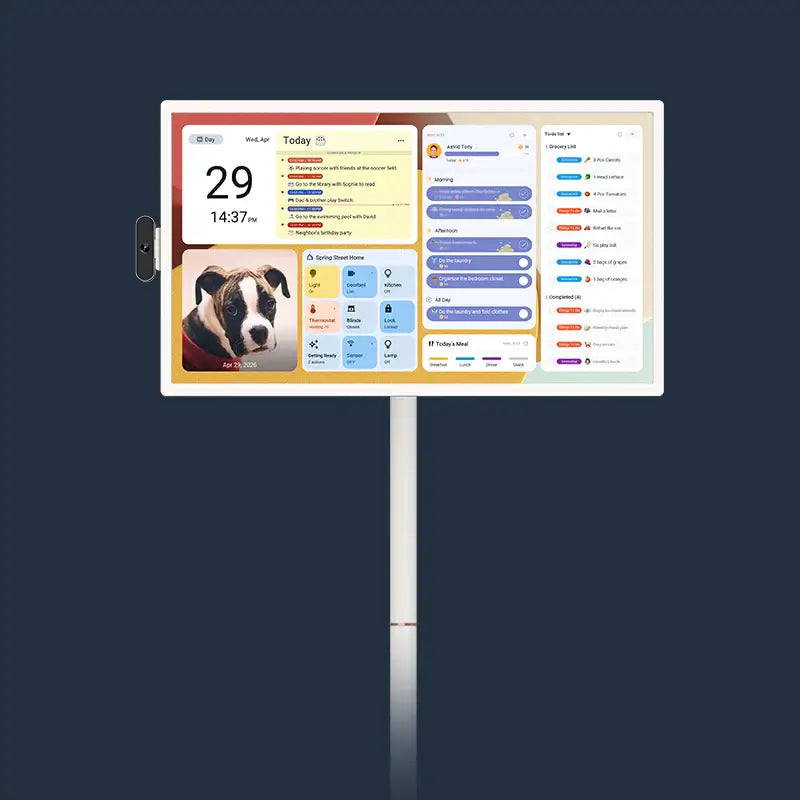




Black Friday digital calendar deals are worth considering only after you know where the screen will go, who needs to read it, and what the checkout price covers. A low sale price cannot fix a calendar that is too small for the room, awkward to mount, or unable to show the schedules your family already uses. Ask the five questions below before you place an order.
The Five Questions to Ask Before You Buy
- Will everyone be able to read the screen where it will live?
- Does the size fit the room and the viewing distance?
- Can you mount or place it the way your home needs?
- Does it work with the calendars and household tools you already use?
- What does the Black Friday price actually include?
Start with Question 1 and work down the list. By the time you reach the price, you will know whether the calendar fits your home and daily routine.
Will Everyone Be Able to Read the Screen Where It Will Live?
The best digital calendar for a family is one people can notice and read during normal routines. Pick the location first, then stand in the places where people will actually glance at it: the kitchen doorway, breakfast table, hallway, or entry. If the screen is only clear when someone walks close to it, it may not become the shared reference point you hoped for.
The Daily Glance Test
Use a piece of paper or painter’s tape to mark the screen’s rough footprint on the wall or counter. Notice whether it is easy to see while packing lunches, putting on shoes, or walking past with a bag in hand.
Ask each person one simple question: “Can you see what happens next without stopping?” A calendar earns its place when it answers that question quickly. Young children may need to reach the lower part of a touch screen, while adults may need enough space to read a week with several events.
Check these details before you buy:
- The screen is not blocked by an open cabinet door, pantry door, or refrigerator door.
- Light from a window or overhead fixture does not make the display hard to see at the busiest time of day.
- The location is near the family traffic flow, rather than in a room that only one person uses.
- The screen can show the amount of detail your household needs without every entry looking crowded.
Visibility comes before extra features. A simpler screen that everyone checks can help more than a display placed where no one looks.
Does the Size Fit the Room and the Viewing Distance?
Match the screen size to the wall, counter, and viewing distance, not to the biggest discount. A larger display gives busy households more room for calendars, meals, tasks, and routines. A smaller display can make more sense on a narrow counter or in a small apartment.

Screen Size and Room Fit
For a digital calendar screen size for kitchen use, start with the space around the screen. A compact model can work well on a desk, sideboard, or clear stretch of counter. A mid-size screen often suits a kitchen or home office wall where several people can glance at it. A larger screen is easier to read from across a family room or a wide kitchen, but it needs enough empty wall space to look intentional instead of crowded.
Use this simple planning table before comparing offers.
| Your home situation | A practical starting point | What to check in person |
|---|---|---|
| Limited counter or desk space | A compact screen placed close to users | Whether it leaves room for everyday items and a power cable |
| Kitchen or office wall with regular foot traffic | A mid-size screen at eye-friendly height | Whether people can read the next event while moving through the room |
| Open living area or a busy family hub | A larger screen with more viewing room | Whether the wall, outlet, and viewing distance support the larger footprint |
The table is a starting point, not a strict formula. Print or tape up a paper outline in the planned size and view it from the farthest regular seat or doorway. That small test can prevent a sale purchase from becoming a return.
The Right Amount of Information
Size also changes how much you can show at once. A household with several calendars and routine cards may need more room, while a couple who mainly needs appointments may prefer a cleaner, smaller display. The right screen stays readable when the week gets full.


Can You Mount or Place It the Way Your Home Needs?
Confirm the mounting method before you buy, because the right screen still needs a stable, reachable home. A wall mounted digital family calendar can free counter space and put the schedule in a natural walking path. A desktop setup may work better when you rent, want a temporary location, or need the screen close to a work area.
Wall Space, Power, and Reach
Check the wall material, nearby outlet, and cable route before a sale ends. Do not choose a spot over a heat source, where splashes are likely, or where a cable crosses a busy walkway.
Measure the open wall area, then compare it with the product dimensions and the mount requirements. If you want to swap orientation or move the display later, confirm that the stand or mount supports that plan. A clean installation is easier when the power source and mounting hardware are part of the decision from the start.
Refrigerator and Metal-Surface Plans
A refrigerator can look like the obvious place for a family calendar, but it needs a model-specific mounting check. Built-in magnets on a device may not be designed to hold its full weight directly against the refrigerator. Read the manufacturer’s installation guidance before relying on a magnetic setup, especially for a larger screen or a high-touch location.
For example, our digital-calendar mounting templates let you check the correct model footprint before installation. Treat a mount as a safety decision, not an accessory you can sort out later.

Does It Work With the Calendars and Household Tools You Already Use?
Buy a digital calendar that can display the schedule system your family already trusts. A new screen should reduce repeat questions, not create a second place where someone has to enter every appointment. Before you compare Black Friday digital calendar deals, write down every calendar, task list, and app that needs to appear on the shared display.
Calendar Connections
Start with the phones and accounts already in use. One adult may use a work calendar, another may use a personal calendar, and a school may send events through a separate service. Check whether the model can connect to the calendar services you use and whether changes appear both on the screen and in the mobile app.
Then test the routine that matters most. If the setup requires manual copying, decide whether your household will truly keep up with it during a busy week.
Household Features That Matter
Feature lists can look similar, so tie each one to a real task. Meal planning matters if someone checks dinner while making a grocery list. Chore and reward tools matter if children will use the screen to see what they own that day.
Make a short “use it or skip it” list before shopping:
- Shared calendar viewing and updates
- Grocery, meal, or task planning
- Chore routines and family rewards
- A customizable dashboard or widgets
- Photo display and privacy controls
If a feature does not solve a repeated problem in your home, do not let it decide the purchase. Compatibility with the tools you already open every day is usually the better value.
What Does the Black Friday Price Actually Include?
Compare the final cost, not the discount badge. Read the product page, cart, and promotion terms before paying, especially when the deal uses a code, a minimum spend, a bundle, or a checkout-only discount.
The Final-Cost Checklist
Keep the product page open while you review these items:
- The exact screen size, color, and configuration in your cart
- The sale price, any code, and the date or time the offer ends
- Included items such as a stand, wall bracket, power adapter, or mounting hardware
- Shipping, taxes, and return conditions for your location
- The cost of accessories you need for your chosen placement
Take a screenshot of the cart and the offer terms before you submit the order. It gives you a record if a code does not apply as expected.
Today’s Features and Future Costs
Ask which everyday tools are included under the current pricing. Check the features you plan to use most, such as calendar sync, meal planning, chore rewards, photo uploads, and dashboard customization. Then read the terms for any optional services or accessories that may add cost.
For a family screen, a sale is a good result only when the product, placement, and ongoing use all fit. A lower price on the wrong setup is still the more expensive choice.
Compare the Setup Before You Compare the Sale
Start with the room, then check size, mounting, compatibility, and the final cart total. That order makes Black Friday digital calendar deals easier to judge because you are comparing options against your own home, not against a percentage badge. When you are ready to see a model’s current configuration and purchase details, view our 21.5-inch Digital Calendar and confirm the selected option before checkout.
Black Friday Digital Calendar FAQs
Q1: Is Black Friday a good time to buy a digital calendar?
Yes, if you have already decided where it will go and which features you need. Seasonal discounts can lower the purchase price, but check the end date, chosen model, included hardware, shipping, and return terms before assuming two offers are equal.
Q2: How far away should a family calendar screen be readable?
It depends on the size of the text, the amount of information on screen, and the room. Test the planned location from the doorway, table, or seating area where people will glance at it. If the next event is hard to read from that spot, consider a different location or screen size.
Q3: Can a digital family calendar sit on a kitchen counter?
Yes, a counter setup can work well when the screen is close to the people using it and clear of splashes, heat, and food-prep space. Confirm that the model includes or supports a suitable stand, and plan where its power cable will run.
Q4: What should a shared calendar screen connect to?
Start with the calendar accounts your household already uses, then check whether the model supports the task, meal, and routine tools you expect. A screen that fits your existing system is easier to keep current than one that asks everyone to rebuild their schedule.
Q5: Should I buy accessories during the Black Friday sale?
Buy accessories at the same time when they are necessary for your planned setup, such as a wall mount or a stand. Wait on optional extras until you know how your family uses the screen. That keeps the first purchase focused on the setup you actually need.